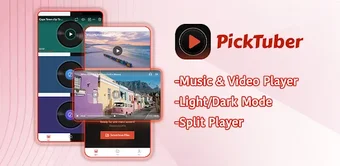
Split-screen player for simultaneous local video playback
On Android, Pick Tuber: Split Video Player from Shadman IT Solutions helps you watch and compare multiple local videos simultaneously. The app presents a split-screen layout for concurrent playback, letting you import files from device storage and control each pane independently with play, pause, and seek. It supports various local video and audio formats, offers gallery-style browsing, and processes media entirely on-device to preserve privacy. This makes it useful for multitaskers, video editors, and sports fans needing side-by-side comparison on a single device.

Unlock your creativity with Adobe Stock
Get 10 images or 1 video with a free trial
When you need parallel playback and direct comparison
You can use the app to watch, compare, or monitor multiple video streams without switching apps, a design that addresses the need to compare camera angles or follow simultaneous sports events. The split-screen presentation keeps each clip visible while independent controls let you sync, pause, or seek specific panes. This focus on side-by-side viewing suits multitaskers and professionals who examine footage rather than perform timeline edits.
How the app fits into local workflows and file handling
You access video and audio files stored on internal or external device storage, so you open clips without an internet connection. The player handles multiple Android-compatible formats and decodes media on-device; the developer states that content is processed locally and not uploaded to remote servers. Typical workflow steps you follow:
- browse gallery and preview files
- tap items to populate split panes
- use independent controls to start and sync playback
Who gets the most value from its simplified split-screen design
If you need to compare clips quickly, the simplified interface focuses on split-screen media management, so you can assemble panes and control each one without mastering a timeline editor. You get per-pane play, pause, and seek controls that support review tasks and monitoring. Professionals who require frame-by-frame assembly or mixing should pair this tool with a dedicated editor, because the app emphasizes playback comparison over in-app finishing tools.
A practical gateway for focused review and simultaneous viewing
If you want a device-based tool to organize and review multiple clips, Pick Tuber serves as a sensible entry point for multitaskers, reviewers, and sports watchers named by the developer. Use it as the viewing stage in a mobile workflow and pair it with a separate editor when you move into assembly or finishing; the app simplifies comparison and monitoring rather than replacing production software.